


Airbnb's solution for planning group travels.- UX Challenge
- Apr 13, 2022
- 6 min read
Updated: Aug 5, 2024
Airbnb is finding a way to help plan group travels. They found that when
planning a trip with friends, lots of time and effort is spent in agreeing on
a budget, time, place, and activities to do.
An end to end flow for Airbnb, where a group of people can give their
preference for travel (date, budget, place, etc) and Airbnb suggests some
places and activities to do.

The problems in trip planning
What are the issues people face while planning a trip with friends or family?
Difficult to find new destinations and packages.
Time consumption to learn about the place.
Different opinions, interests, and disagreements.
Time and Expense management.
Need to use different applications/platforms to Find, Plan, Execute, and, Finish trips.
The Solution
Users can easily find new travel destinations and packages with their interests, attitude, and behavior.
Get all relevant information to users by the app itself.
Personalization, filter, and tags are helps to find the most accurate and compatible destination and packages for group planning.
Timely alert/notification and full travel guide and recommendations help to manage Time management
Expense splitter/planner helps to effortless expense management
The process
The way I choose to get the solution was the design thinking method. It keeps users and their needs as a central object and, all processes are revolving around them. Thus, get the final solution is usable and meets all user requirements and goals.
1. Empathy
User research
Competitor analysis
Affinity mapping
2. Define
User persona
Empathy mapping
User journey map
3. Ideate
Brainstorming
User flow
Information architecture
4. Prototype & Test
Low fidelity wireframes/Sketches
High fidelity wireframes & Visual design
Strategy
Goal: To build a product that helps group travelers to Find, Plan, Execute and, Finish a trip seamlessly.
Technology/Platform: Airbnb Android/iOS applications’ feature/functionality update.
Target audience: Male, Female, Others | Age above 18.
1. Empathy
Primary research
Quantitative research
Qualitative research
Secondary research
Find and analyze existing applications, Research, and solutions
Critics analysis
Studying data from the internet
Primary research
1. Quantitative research
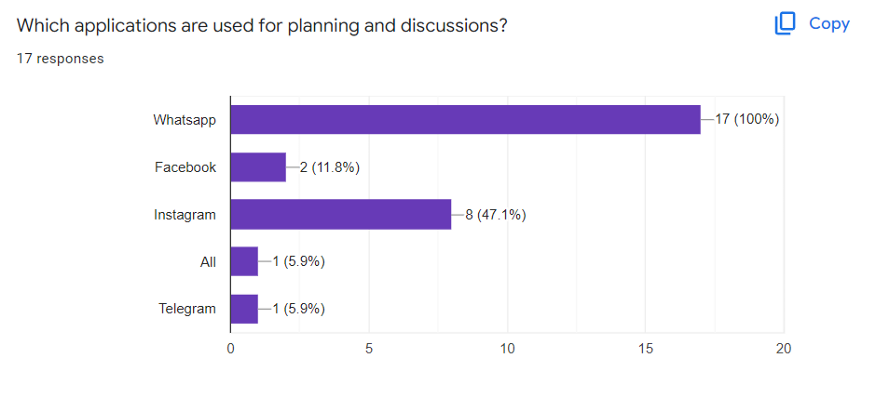
The quantitative research was intended to gather a basic understanding of the problem and behaviors. I did an online survey with Google forms. Prepared some quick action objective questionaries and sent them to some people in my friend/family circle. I received 15+ responses.




2. Qualitative research
For qualitative research with the time constraints, I choose 2 people to gather a deep understanding of the problem, user behaviors, attitudes, insights, and pain points. Both of them are my friends and are very experienced in traveling. I have done telephonic interviews with them. It helps to get an in-depth understanding of the problem.
Person 1
Working professional | Male | 34 yrs | Married
Going for both Solo & Group trips | Going with friends, family, and also with club members
Person 2
Working professional | Male | 28yrs | Unmarried
Going for both Solo & Group trips | Going with friends and family.
Major touch points of the qualitative research
Learn about the process of common behavior.
How do people find destinations, accommodation, Packages, etc?
To know about communities and groups.
Existing channels, and platforms abroad.
Pain points, Frustrations they faced or facing.
Listening to their insights, perspectives, and vision.
Affinity mapping
The collected research data had brainstormed and grouped into categories.

Key insights from the primary research
The social media platforms like Instagram, Whatsapp, and Youtube are widely used for finding and executing trips and packages.
People consider others' preferences and interests to planning group trips, but there are some problems or somebody will sacrifice their interest sometimes to execute the trips.
Rough budget planning is lit-bit tedious and, the swing in expenses is affecting.
Incomplete pieces of information are makes confusion and fear.
The need to use different applications sometimes makes trips tiring.
A digital travel guide will help to make trips more amusing.
Secondary research
The secondary research was intended to identify and learn existing research on the same problem. I identified some applications already trying to solve the problem already.
Travel Buddy
Travel Planner
Splitwise
I did an in-depth study over the applications on how these applications are solving problems for their end-users.
Also, read articles, and watched videos about group traveling and packages. Friends help me to get an idea about casual collaborations, groups, planning, and execution of trips and also I recall my experiences too.
Competitor analysis
Identified some already existing applications that would be somewhere in similarities to the same problem. Analyzed with predefined criteria.


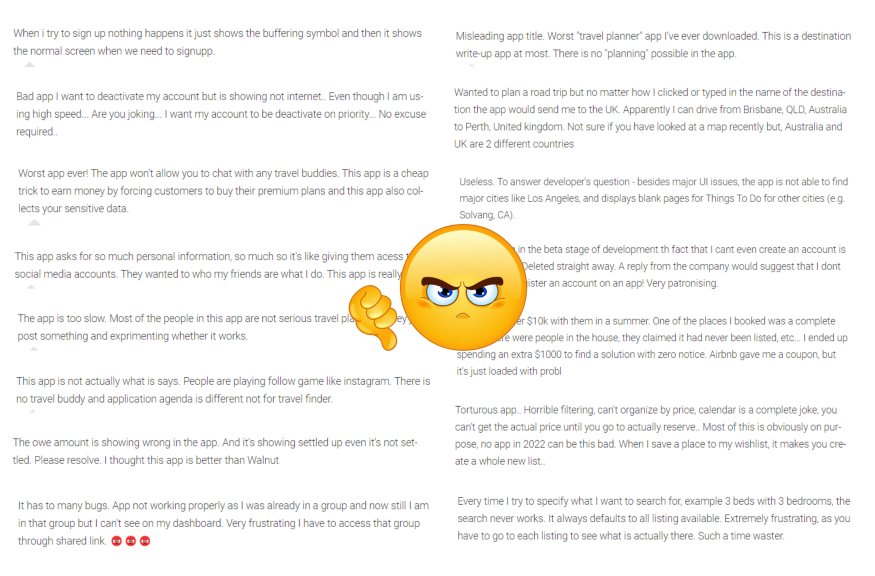
Critical rating analysis (Google Playstore)
One of the easiest ways for identifying user pain points and insights is collecting and analyzing critical rating issues from Appstore or Playstore against competitor applications.
2. Define
User persona
After getting a deep understanding of the users I prepared user personas. It represents the cumulative information about the end-users, user goals, pain points, behavior, and attitudes. It gives an idea of which problems I need to solve and how to find possible solutions. **By considering time constraints I visualize only one user persona here.

Empathy map
Creating an effective solution requires understanding the true problem and the person who is experiencing it. The exercise of creating the map helps to consider things from the user’s perspective along with his or her goals and challenges.

User journey map
Here I have visually illustrated the user journey through the solution, starting from initial discovery and continuing through the process and services into long-term loyalty and extension. It also contains the tasks, feelings on each stage, and what are the factors expected by users in each stage. https://bit.ly/3K50qQH

3. Ideate
User Flow and Information architecture
After the defining stage, I got a deep understanding of the user problems, goals, and insights into the problem. I brainstormed the understanding and findings deeply and found all possible solutions. The possible solutions are again brainstormed and tried to make the most possible solution to execute. Here I have shared a user flow for the best possible solution. https://bit.ly/3j1cWoc

4. Prototype & Test
1. Low fidelity sketches
After finding out the best possible solution I had roughly drawn some paper sketches. It helps to re-confirm the solution.

2. High fidelity wireframes https://bit.ly/3qYofSH
I have designed wireframes for the flow from “Create a group in Trips” to “Check date availability & Save a group trip”. Users can create new groups and add members to the group. Already existing members will be directly added to the group. For non-existing members, the user can send an invitation link to their mobile number and they can join the group with the link itself. All created groups will be shown in the “Trips”.

By opening the group users can see all members and he/she can add new members too. By clicking the member profile icons user can see their interests and preferences. Also, there is an option to make a phone call with the member for personal discussions.
Users can add their interests by clicking the “Me” profile icon.
Explore tab will show all the relevant destination/package recommendations with different categories.
By choosing a package/destination the user will get all relevant information, daily charts, expense details, etc… Users can share the trip/package with other persons or groups outside the platform by using Whatsapp or other platforms.
By clicking “Recommend to group” the package will escalate to the “Our trips” tab menu on the group page and, other members get a notification about the recommendation and they can view the details too.

All recommended packages/destinations will be shown on the “Our trip” tab. So all the group members can view the details and add support to the recommendations by taping the “Hand icon”. The schedule option is only visible to the group owner/admin. By considering the support and further chat discussions the admin can schedule the trip. By clicking schedule it will be triggered to date availability and schedule page. Admin can check the availability and save the trip on a suitable date.

3. User interface visual designs (sample)

Here I have shared 3 screen UIs. The first screen is for the “Our trips” tab inside a group. In the tab, I will be showing all the member recommended packages or destinations with all important details and interactions. Second screen: Once the team fixes and schedules a trip then the screen may look like this. All trip details will be easily get by using the single tab on the group screen.

Conclusion
From all the processes that have been carried out until the final process, it can be concluded that the users can easily understand the user flows, the user feels that the experience of using the application can be easier than the user experience of the applications those I had to select for analysis. The information presented in the design also helps the user to solve the problem quickly and also, the information is valid and useful. So that it does not require the user to overthink.
Thanks for reading my case study! If you can provide criticism or suggestions about the case study, I will be very grateful.


